Total v6.6 WordPress Theme
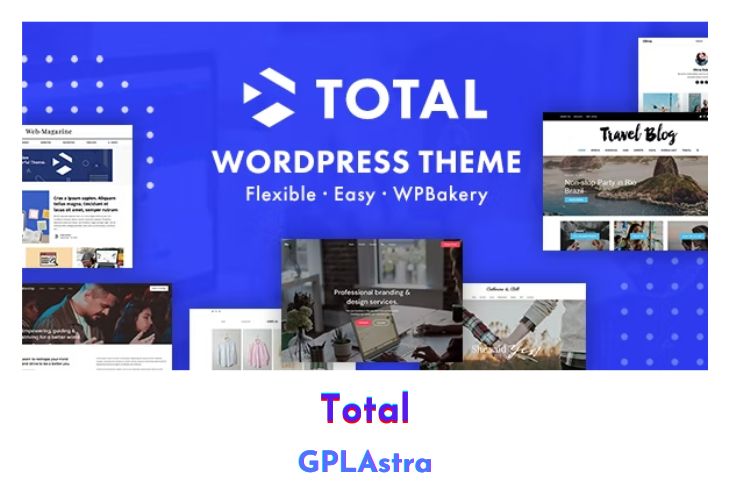
Total is a modern and highly responsive WordPress theme that seamlessly blends the flexibility of the WordPress Customizer with the intuitive Visual Composer page builder, allowing users to create websites for virtually any purpose. Designed with versatility in mind, Total caters to a wide range of niches and professions, including corporations, small businesses, online stores, legal firms, agencies, wedding planners, hosting companies, non-profits, and bloggers. With an extensive array of features and settings, Total empowers users to craft bespoke websites tailored to their specific needs. Its growing list of demos provides a glimpse into the vast possibilities offered by this premium WordPress theme.
Ideal for freelancers, Total streamlines website development by eliminating the need for multiple themes for different clients. With Total, freelancers can import stunning demos and customize them to meet each client’s unique requirements swiftly and efficiently. The theme’s integration with WooCommerce and provision of Unlimited Portfolios further enhance its capabilities. Whether starting from scratch or tweaking existing designs, Total’s combination of affordability and functionality makes it an indispensable tool for website creation.
| Name | Total |
| Type | WordPress Theme |
| Version | 6.6 |
| File Name | Total |
| File Type | rar (Archive, please extract before use) |
| File Host | mediafire.com | Mirror |
| Updated On: | 4 hours ago |
Core Features of Total WordPress Theme
- Seamless integration of WordPress Customizer and Visual Composer page builder.
- Suitable for various industries and professions, including corporations, small businesses, online stores, legal firms, agencies, wedding planners, hosting companies, non-profits, and bloggers.
- Extensive features and settings for creating diverse websites.
- Perfect for freelancers, enabling them to use Total across multiple client projects.
- Wide range of industry-specific homepage examples showcasing Total’s versatility.
- Packed with features like WooCommerce integration and Unlimited Portfolios.
- Affordable price point making Total accessible to all users.
- Unlimited Custom Pages with Visual Composer for effortless layout customization.
- Easy-to-use WordPress Customizer for real-time theme adjustments.
- Responsive design ensures optimal viewing experience across devices.
- Growing list of demos providing insight into Total’s potential.
What’s New (Changelog) in Total v6.6
v6.6 Changelog
Version released on Mar 9, 2026
View Release Article
Standard pages and WooCommerce pages now use <div> instead of <article> for their main page container. If you have custom CSS targeting the <article> element specifically, please review your styles to ensure your customizations still apply.
- AddedCarousel Container element, which will allow you to create a carousel using a list of allowed elements (Icon Box, Image, Text, etc).
- AddedGradient background support to various theme elements as well as the WPBakery section, row and column backgrounds.
- AddedGradient text color support to the theme’s Heading, Icon Box, Animated Text & Title elements.
- AddedText shadow option to various theme elements for WPBakery.
- AddedAbility to define a custom field name in the theme’s color picker (available in WPBakery only) for dynamic colors.
- AddedThe ability to split content using the “more” tag in the Icon Box, Feature Box, and Teaser elements, with options to either display a “Read More” toggle that reveals the additional content inline or a new Link option show the extra content in a modal popup.
- AddedTop and Bottom Padding options to WPBakery Rows. These allow you to apply a consistent, responsive padding that automatically compensates for column bottom margins.
- AddedAbility to select from new responsive preset sizes for the WPBakery inner column spacing.
- AddedAbility to enter a Post Cards unique ID to the Search Bar element which will allow you to search the post cards element element in real-time (ajax). This functionality will work in conjunction with filterable grids so you can filter by term and also search.
- AddedLogos Grid Style option to the Image Grid element, ideal for displaying client or partner logos. You can set custom logo width and height to keep all images consistent.
- Added“Logos” style to the Image Carousel element that allows you to set a width and height for each logo for a uniform display and will center align the items.
- AddedOption to the Posts With Thumbnails widget to enable title accent color on hover.
- AddedThe ability to link to the current post in the Feature Box and Icon Box elements.
- AddedCustomizer option to control the pagination active border color.
- AddedOptions to the built-in post type setting admin pages to toggle on/off the main and card settings meta boxes.
- AddedFunctionality so when you start typing a dynamic variable into a text field in WPBakery it displays a dropdown to easily choose one.
- AddedAlign Border with Content on/off switch to the Column Side Border element for WPBakery.
- AddedNewer Kinsta staging URL patterns to the License Manager for activating the license in Staging mode.
- AddedVisible notice to the WPBakery row edit window when creating custom cards to recommend setting the Inner Column Gap to 0px.
- AddedA “create custom card” link under the select Card Style for the Post Cards and Term Cards element so you can easily open the new card editor as well as a refresh button next to the select field so you can make use of any newly registered cards (via the admin or filter) without having to refresh the page.
- AddedA “create new template” link to the WPBakery edit window for dropdown fields that allow you to select a dynamic templates. This way you can create a new template and select it without having to the page.
- AddedOn click options to various elements (Button, Icon Box, Image, Image Banner, Teaser, Feature Box) so you can open the card popup modal without having to link the entire card.
- AddedOption when creating custom cards to define a custom modal template, this way you don’t have to define it on a per-Post Cards basis and it works with the new ability to open the Card Modal from elements added inside the card.
- AddedOption to the Button, Icon Box, Teaser and Feature Box so you can open a custom modal template (great for things like opening a popup Contact Form).
- Added“Modal” as a new Dynamic Template type option which you can use for your custom modal templates instead of using the “Part” type – when choosing this template type it will display extra settings to disable the title, customize the title and set a custom width and border radius.
- AddedOption to select the element tag (div or article) to use when creating “Single” dynamic templates.
- AddedA fallback parameter to the cf_value shortcode.
- AddedA “custom_field” parameter to the theme icon shortcode.
- AddedLinks to the theme documentation and changelog under Appearance > Themes when clicking on the Total theme under the theme details for quick access to these pages.
- AddedFill Column option to WPBakery Inner Rows. When enabled, the inner row expands to match the column height, making it easier to create equal-height columns with backgrounds.
- AddedOn Click Option to the theme Button element for opening a modal template.
- AddedOverlay options to the WPBakery Inner Rows.
- AddedBackground image source option to the WPbakery Inner Rows.
- AddedWhite (No Hover Opacity) transparent header style.
- AddedAn option to the Image Banner & Feature Box elements named “Contain Content” which can be enabled to keep the content aligned with the rest of the site when used inside a row set to “Stretch row and content (no paddings)”. This works great with the new Carousel Container element for creating full-screen sliders.
- AddedMinimum Height option to the Video element, this is useful when using the Fill-Column option but you want to force a minimum height.
- AddedButton overlay icon style to the Video element. When selected it will display a pill shaped button with a play icon and the text “Play” next to it.
- Addeda Sticky on/off option to the WPBakery column and inner row elements. When enabled, it will use the CSS sticky position to remain visible while scrolling, as long as neighboring columns have more content or are taller than the sticky column or column containing the sticky inner row.
- Added“Direction-Aware Sidebar” page layout type which can be selected for multilingual sites to display a right sidebar on lTRL
- UpdatedThe Category Tag image overlay styles to work with non-public taxonomies.
- UpdatedThe color picker – better placement, dropdown instead of modal for the color palette selection and new visible clear button.
- UpdatedThe color picker so you can’t edit the color using the picker when a global color is selected to prevent unintended changes
- UpdatedResponsive WPBakery theme fields (e.g. Font Size) so empty inputs show placeholders with the value that will be used at that breakpoint, making it clear that previous values carry over to subsequent screen sizes.
- UpdatedThe Spacing element so it only has a single field for the size which is consistent with Font Size fields that feature a toggle on the side to enable responsive mode.
- UpdatedThe WPBakery Column Margin element so it renders better in the front-end editor with a preview of the divider.
- UpdatedIcons used in WPBakery for certain theme fields that allow you to swap from a select field to a text input or from a single input to a responsive input.
- UpdatedThe Table of Contents element so you can exclude headings by giving them the classname toc-exclude or toc-ignore.
- UpdatedThe theme to auto detect if the current site is a staging environment and activate the saved license instead in staging mode instead of showing a duplicate license error.
- UpdatedThe license manager to treat www and non-www URL’s as the same site.
- UpdatedThe built-in custom post type settings admin pages now hide irrelevant fields. For example, when Single Post is disabled, the custom slug field is automatically hidden.
- UpdatedThe built-in custom post type settings admin pages to display placeholders so you can see the default text field values.
- UpdatedThe animation delay and animation duration fields in WPBakery elements will now be hidden if an animation isn’t selected.
- UpdatedVarious customizer fields to allow direct input instead of a dropdown of preset options for greater control.
- UpdatedVarious theme element fields to allow custom input so you are not limited to the preset options.
- UpdatedThe Custom CSS panel so it can expand vertically to display all custom CSS rather then having a scrollbar.
- UpdatedThe WPBakery Inner Row to also make use of the theme’s color pickers for background and border colors.
- UpdatedCard Modal Dialog design so if the title is hidden the border is removed at the top and the padding below the close button is reduced a bit for a cleaner look.
- UpdatedVideo element for improved accessibility.
- UpdatedVideo element to prevent auto playing in the WPBakery frontend editor or the Elementor editor.
- UpdatedThe Fixed Height option in the Image element so it’s available when an aspect ratio is selected and you can toggle responsive mode to set a different height at different breakpoints.
- UpdatedThe Minimum Height option in the Image Banner element so you can now define a value at different breakpoints.
- UpdatedThe default layout for standard pages to be Full Width (No Sidebar). This update affects only new installations and will not change existing sites.
- UpdatedThe Post Cards & Term Cards Flex Basis field to allow entering a different value at each breakpoint and to allow up to 12 columns when choosing a preset.
- UpdatedThe Left and Right sidebars to be directionally aware meaning if you use the Right Sidebar layout it will display on the left when the site is viewed in RTL mode. This update affects only new installations and will not change existing sites. To opt into this feature on an existing site, hook into the new “totaltheme/sidebars/primary/is_bidirectional” filter.
- Fixed“Function _load_textdomain_just_in_time was called incorrectly….” debug notice in WordPress 6.9.
- FixedIssue with the Custom Field input not showing your saved value when re-opening the WPBakery element edit window.
- FixedIssue with the Category Tag image overlay style displaying a debug error for posts without terms.
- FixedIssue with the Post Terms element where excluding a term would leave an extra separator when using the list style.
- FixedIssue with the “Fill Column” option not working with the Image element when the image has a link.
- FixedIssue with the Theme Button icon transform on hover not working with the Plain Text button style.
- FixedThe default or custom pagination background color wasn’t working with the Gutenberg Loop Query block pagination.
- FixedThe WPBakery “Color Picker Settings” module couldn’t be enabled.
- FixedCustomizer issue where setting hover or active colors without defining the default color could cause the previously set hover or active colors to appear not applied in the live preview when re-opening the Customizer, even though they display correctly on the live site.
- FixedPost Thumbnail Grid Widget showing the selected columns field as a deprecated value.
- FixedIssue where the Icon Box wouldn’t allow “0” as the heading text.
- FixedIssue where the Template Part element would not show template choices in the WPBakery backend editor.
- FixedIssue where the WooCommerce checkout select field was using the accent color for the background but not the on accent color for the text.
- FixedLink to the Post Types unlimited plugin from the built-in custom post types admin setting pages.
- FixedIssue where you couldn’t upload custom font files from the Font Manager in newer versions of WordPress.
- FixedIssues with Image Sliders inside card modals or toggle elements not pausing on close.
- FixedImage slider elements not rendering correctly in the theme’s dialog modal element.
- FixedIssue with YouTube videos potentially not playing right after clicking the overlay image in the Video element.
- FixedIssue with full width WPBakery Rows (with stretched content) in the latest version of Chrome and Edge.
- FixedTop Bar item shortcode adding a side margin when stacked causing the items to not appear perfectly centered on small devices.
- FixedIssue where using the wpex-sticky class on an element inside a WPBakery column would cause the column’s content to display at the top even though the parent row’s “Content Position” option was set to “Middle”.
- FixedIssue where the Forum Archive Layout set in the Customizer for bbPress was not being used for forum search results and forum view pages.
- FixedDeprecated get_class() notice in woocommerce_template.php
- FixedTheme related debug errors in PHP 8.5
- RemovedWPBakery Slim Mode recommendation under Site Health.
Sales Page and Live Demo of Total WordPress Theme
https://themeforest.net/item/total-responsive-multipurpose-wordpress-theme/6339019
Free Download Total Latest Version
⚡ Premium Access
Unlock All Premium Features
Unlimited Downloads
No Restrictions
Direct Download Links
Access to Private Content