WPCodeBox 2 v1.3.1 Plugin
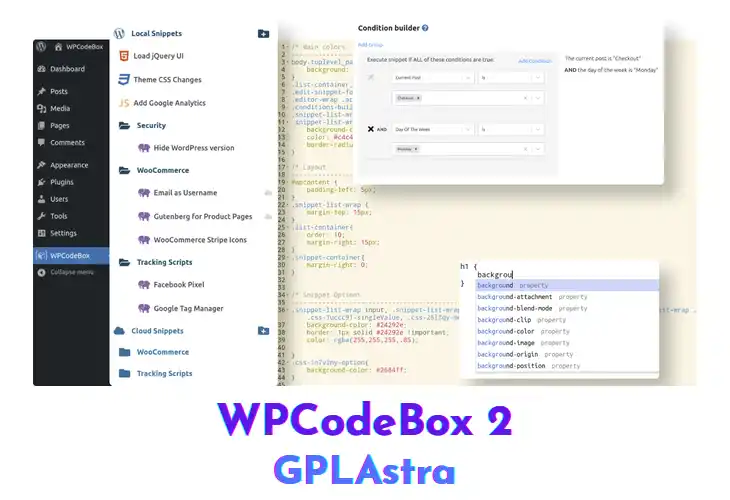
WPCodeBox lets developers store, edit, and run code snippets directly inside the WordPress admin. It supports PHP, JavaScript, CSS, as well as SCSS and LESS, automatically compiling the latter into clean CSS. The built‑in editor offers WordPress‑aware autocomplete, so you can reference functions, hooks, and template tags without leaving the screen. Whether you’re building a theme, tweaking a plugin, or testing a one‑off fix, the plugin keeps everything organized in one place.
After installing, you’ll find a new Snippets menu where each entry can be saved as an inline block or linked to an external file. Choose the language tab, type your code, and the editor instantly highlights syntax errors and suggests WordPress functions. Enabling the SCSS/LESS toggle compiles the stylesheet on save, eliminating a separate build step. The lightweight interface loads quickly, and snippets can be activated site‑wide or on specific post types. Give it a try and see how smooth snippet management feels.
| Name | WPCodeBox 2 |
| Type | Plugin |
| Version | 1.3.1 |
| License | GPL v2 |
| Live Demo | View Official Page |
| Last Updated |
Core Features of WPCodeBox 2 Plugin
- Snippet Library Management: Store, edit, and categorize code blocks in a searchable library, keeping your custom logic tidy and accessible.
- Inline and External Files: Add snippets directly in the editor or reference external JavaScript or CSS files, giving you flexibility for small tweaks or large assets.
- SCSS & LESS Compilation: Write SCSS or LESS and let the plugin compile it to standard CSS on save, removing the need for external build tools.
- WordPress‑Aware Autocomplete: Autocomplete suggestions include WordPress functions, hooks, and template tags, speeding up development and reducing typo errors.
- Language Specific Syntax Highlighting: Each language tab highlights syntax accurately, so PHP, CSS, SCSS, JavaScript, and HTML are easy to read at a glance.
- Conditional Snippet Activation: Activate snippets only on the front‑end, admin area, or specific templates, preventing unnecessary code execution.
- One‑Click Snippet Execution: Run a snippet instantly from the toolbar to test changes without publishing the entire page.
- Import/Export Snippet Packs: Export a collection of snippets as a JSON file and import it on another site, simplifying migration or team sharing.
- Lightweight Admin Interface: The UI loads in seconds and stays responsive even with dozens of snippets, preserving admin performance.
- License‑Based Cloud Sync: Sync your library to the cloud when a valid license key is present, ensuring your snippets are backed up across installations.
- No Database Nulling Required: The core plugin works out of the box without any database nulling, so you can start coding immediately.
- Post‑Type Targeting: Target individual post types or taxonomies, allowing fine‑grained control over where custom code runs.
- Real‑Time Error Detection: Errors are flagged as you type, letting you correct issues before the snippet is saved or executed.
What’s New (Changelog) in WPCodeBox 2 v1.3.1
- New Feature: Optional capability for the AI model to execute code to retrieve the current site context
- New Feature: Support for up-to-date Gemini models
- New Feature: OpenRouter model integrations
- New Feature: Custom model option
- New Feature: Option to hide both panels using Ctrl + ~
- Improvement: Configurable setting for the number of revisions to save
- Bugfix: SCSS minification issues
- Bugfix: CSS minification incorrectly altering colors in some cases
- Bugfix: SCSS/CSS formatting replacing single quotes with double quotes
Free Download WPCodeBox 2 Latest Version
Premium Member Access
Skip the wait — get instant access to all files
Unlimited Downloads
No Wait Timer
Direct Download Links
Access to Private Content